
[OCI] OCI에 설치된 ubuntu VM에서 8080 포트 웹서비스 설정하기
OCI에 설치된 ubuntu VM에서 8080 포트 웹서비스를 시작하려면 아래 단계를 따라 하시면 됩니다.
- OCI의 Public Subnet의 Ingress Security Rule을 등록합니다.
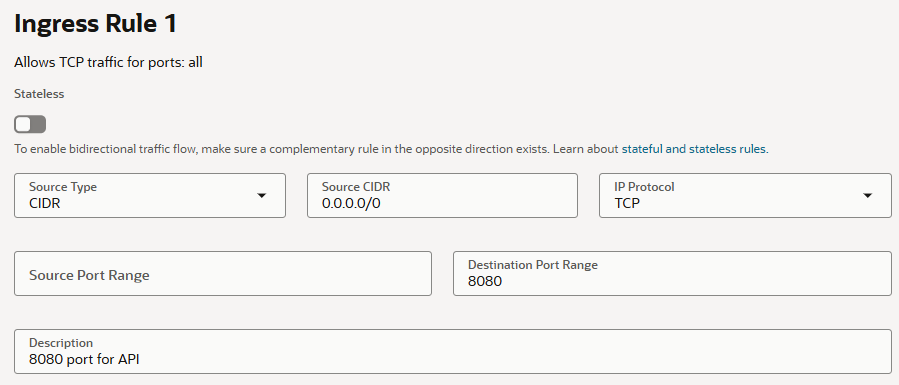
- iptables 정책에 8080 포트 허용정책을 등록합니다.
ubuntu@api:~$ sudo iptables -I INPUT 2 -p tcp --dport 8080 -j ACCEPT
ubuntu@api:~$ sudo iptables -L INPUT
Chain INPUT (policy ACCEPT)
target     prot opt source               destination
ts-input   all  --  anywhere             anywhere
ACCEPT     tcp  --  anywhere             anywhere             tcp dpt:http-alt
ACCEPT     tcp  --  anywhere             anywhere             tcp dpt:https
ACCEPT     tcp  --  anywhere             anywhere             tcp dpt:http
ACCEPT     all  --  anywhere             anywhere             state RELATED,ESTABLISHED
ACCEPT     icmp --  anywhere             anywhere
ACCEPT     all  --  anywhere             anywhere
ACCEPT     tcp  --  anywhere             anywhere             state NEW tcp dpt:ssh
REJECT     all  --  anywhere             anywhere             reject-with icmp-host-prohibited
- /etc/nginx/sites-enabled/default 파일에 아래 설정을 추가합니다. 파란색 글자는 Let’sEncrypt를 적용했기 때문에 추가한 겁니다.
server { listen 8080 ssl; server_name app.domain.com; ssl_certificate /etc/letsencrypt/live/api.yesxyz.kr/fullchain.pem; # managed by Certbot ssl_certificate_key /etc/letsencrypt/live/api.yesxyz.kr/privkey.pem; # managed by Certbot include /etc/letsencrypt/options-ssl-nginx.conf; # managed by Certbot ssl_dhparam /etc/letsencrypt/ssl-dhparams.pem; # managed by Certbot error_page 497 https://$host:8080$request_uri; location / { root /var/www/app/; index index.html index.htm index.nginx-debian.html; try_files $uri $uri/ =404; } } - 만일 Java 서비스로 Backend를 구성하려고 한다면 Ingress Security Rule과 iptables 정책에서 8080 포트 허용정책을 설정하지 않고, /etc/nginx/sites-enabled/default 파일의 SSL 블럭에 아래 설정을 추가합니다.
server {
        location /api/ {
                proxy_pass http://localhost:8080;  # 끝에 "/"를 추가하면 Java 컨트롤러 경로가 변경되니 주의 요망
                proxy_set_header Host $host;
                proxy_set_header X-Real-IP $remote_addr;
                proxy_set_header X-Forwarded-For $proxy_add_x_forwarded_for;
                proxy_set_header X-Forwarded-Proto $scheme;
        }
}